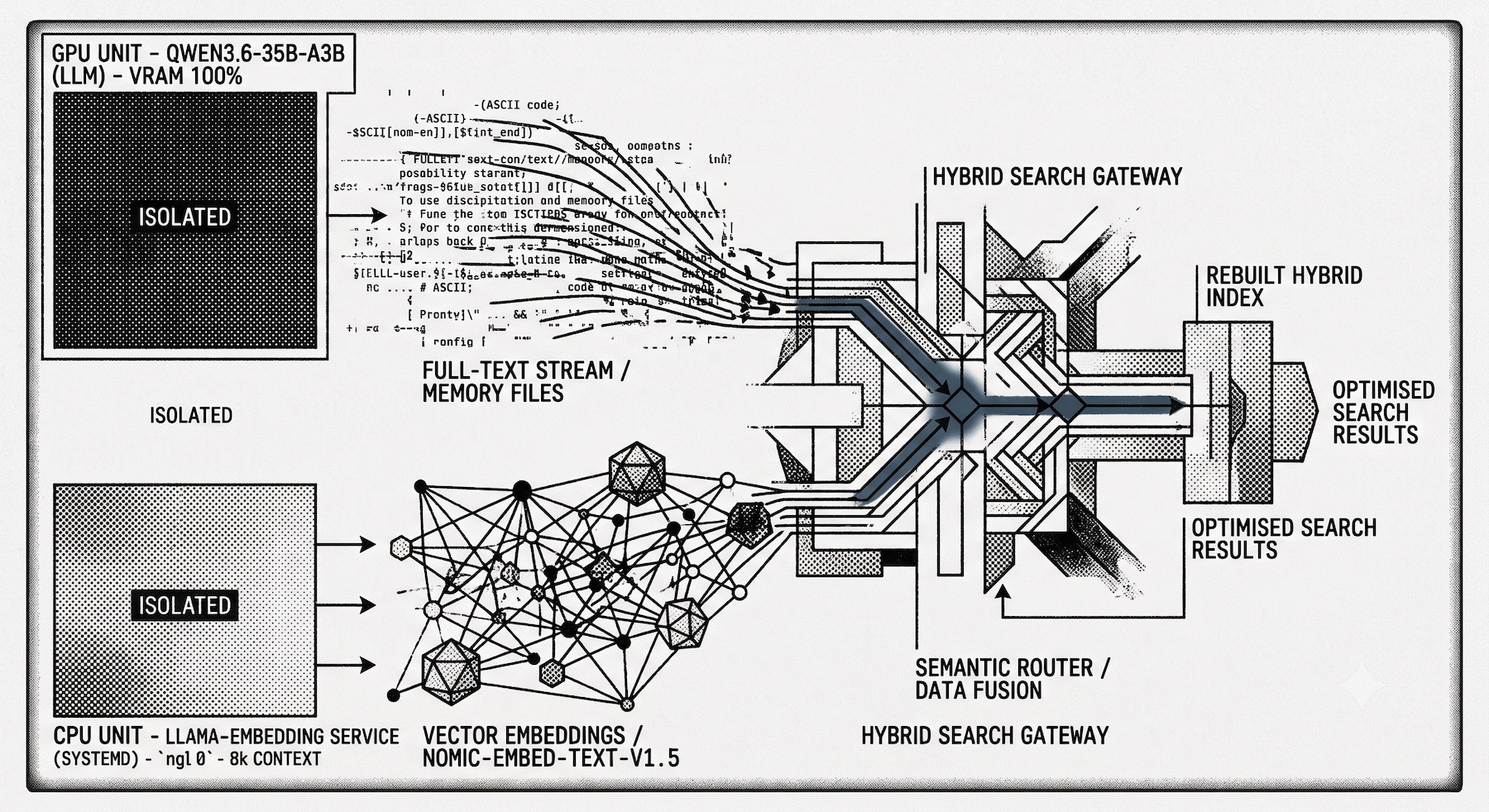
Unless you are using OpenClaw with OpenAI, your current configuration may not be taking advantage of its inbuilt support for RAG. Without access to an embedding service, OpenClaw falls back to full-text search only. In this article, I show the key steps required to take advantage of hybrid search by providing memory_search with access to a privately hosted embedding service.
First, we need access to an embedding service capable of supporting at least text. I'll be using nomic-embed-text-v1.5-GGUF due to its compact size, performance and its support for a large 8k context window—though for this setup, I'll be restricting it to 2k.
The Hardware Constraint: Why CPU?
I am already using llama.cpp to host the largest most competent LLM I can squeeze into 20GB VRAM. Today, that's Qwen3.6-35B-A3B or Ornith 1.0-35B, but that's likely to change in the weeks and months ahead. There are just enough resources on the GPU to run this model at 80-100 tokens per second. While it can be advantageous to run an embedding model on a GPU, for the expected usage I have in mind, the CPU will be more than adequate and therefore reserve it for where it is critical, the LLM.
As Qwen3.6-35B-A3B consumes all the VRAM I have available, attempting to load a second model into the same instance of llama.cpp results in an Out of Memory (OOM) error. To prevent this, I limit the number of active models in llama.cpp's models.ini file by setting models-max = 1.
However, this creates a problem when adding the Nomic embedding model to the server configuration. Even though it won't run on the GPU, simply loading the model would cause the much larger LLM to be purged from memory. I get around this limitation by running a separate service—llama-embedding—and restrict it exclusively to nomic-embed-text-v1.5 on the CPU.
Setting Up the Dedicated Embedding Service
Here is the systemd service file I use to host the embedding model.
/etc/systemd/system/llama-embedding.service
[Unit]
Description=llama.cpp Embedding API Server
After=network.target

[Service]
Type=simple
User=djh
Group=djh
WorkingDirectory=/home/djh/Development/build/llama.cpp
Environment="LLAMA_CACHE=/home/djh/.cache/huggingface" "CUDA_VISIBLE_DEVICES=-1"

ExecStart=/home/djh/Development/build/llama.cpp/build/bin/llama-server \
  --host 0.0.0.0 \
  --port 8081 \
  --hf-repo nomic-ai/nomic-embed-text-v1.5-GGUF \
  --hf-file nomic-embed-text-v1.5.f16.gguf \
  -ngl 0 \
  -t 8 \
  -c 2048 \
  -b 2048 \
  -ub 1024 \
  --embeddings

Restart=always
RestartSec=5

[Install]
WantedBy=multi-user.target
Configuration Breakdown
There are a few critical flags required to keep the embedding service fast and off the GPU:
-ngl 0(Number of GPU Layers): This controls how many layers of the model's neural network are offloaded to the graphics card (VRAM). Setting it to0alongside ourCUDA_VISIBLE_DEVICES=-1environment variable ensures CPU-only execution. The embedding model will not steal any GPU resources from the active LLM.-c 2048(Context Size): This sets the maximum context window for the model to 2048 tokens. Note: OpenClaw uses the tiktoken tokenizer, so its token boundaries are not the same as Nomic's. In my earlier experiments withmxbai-embed-large-v1, I found that while OpenClaw strictly sent 512 tokens, the equivalent count under themxbaitokenizer was higher, resulting in out-of-bounds errors. Providing overhead here is a good safety net.-ub 1024(Micro-Batch / Physical Batch Size): This is the physical maximum number of tokens processed at the hardware level per forward pass.-b 2048(Logical Batch Size): While-ubhandles the hardware-level processing limits,-bdefines the logical maximum chunk of the prompt thatllama.cppwill evaluate at once. Setting this to 2048 ensures that larger text inputs are chunked cleanly and efficiently processed by the CPU without stalling.--embeddings(Enable Embeddings Endpoint): By default,llama-serveris configured to generate text (chat completions). Adding this flag flips a switch that enables the/v1/embeddingsAPI route, which is strictly required to turn text into the high-dimensional vector arrays used in OpenClaw's RAG architecture.
Starting the Service
With the file saved, we need to bring the service online and verify it's working properly.
sudo systemctl daemon-reload
sudo systemctl start llama-embedding
sudo systemctl status llama-embedding
sudo journalctl -u llama-embedding -f
Tailing the live log with journalctl -f is helpful to ensure there are no errors, such as the OpenClaw client attemtping to send content greater than the maximum context window.
Configuring OpenClaw
Next, we turn our attention to OpenClaw. There are three primary things we need to accomplish in the configuration:
- Specify the remote host and concurrency: Point OpenClaw to our newly configured embedding service. Because there are plenty of CPU resources available on the remote host, I'm setting
nonBatchConcurrencyto4. This allows up to four embeddedings to be processed in parallel. - Define model and chunking parameters: We specify
nomic-embed-text-v1.5-GGUFand configure a chunk size of 512 tokens with an 80-token overlap. The overlap is intentionally large to accommodate OpenClaw's fixed-size token accumulator. It does not natively respect Markdown headings (##) or code block boundaries. An 80-token overlap acts as a necessary buffer to preserve context, even if it seems a little on the high side for a typical chunking strategy. - Index extra local paths: I've been building a repository of book summaries in Obsidian on the OpenClaw host. Specifying them as an
extraPathinstantly gives me semantic search over them. If these books were full, unabridged texts, throwing them into OpenClaw's memory this way might be ill-advised. But since they are dense key insights, this is an easy and incredibly useful win.
To achieve this, we update openclaw.json with the following memorySearch block:
{
  "memorySearch": {
    "provider": "openai-compatible",
    "remote": {
      "baseUrl": "http://192.168.1.111:8081/v1/",
      "nonBatchConcurrency": 4
    },
    "model": "nomic-ai/nomic-embed-text-v1.5-GGUF",
    "chunking": {
      "tokens": 512,
      "overlap": 80
    },
    "extraPaths": [
      "/home/openclaw/.openclaw/workspace/obsidian/books"
    ]
  }
}
Rebuilding the Index and Troubleshooting
After saving your configuration changes, restart the OpenClaw gateway. You will then need to force a complete index rebuild so OpenClaw can embed your existing memory and files:
openclaw memory index --force
While this runs, keep a close eye on the output. Watch out for embedding errors such as:
08:03:53 [memory] embeddings retryable error.
Or more fatally:
Memory index failed (main): openai-compatible embeddings failed: HTTP 500: {"error":{"code":500,"message":"input (569 tokens) is too large to process. increase the physical batch size (current batch size: 512)","type":"server_error"}}
If you see these, it usually suggests the embedding model (specifically your -b or -ub parameters in llama-server) is misconfigured with a batch size too small for the chunks OpenClaw is attempting to send.
And that's it! With the index built, searches across your memory files and custom repositories will now automatically benefit from the combined power of full-text and local semantic search, without choking the GPU.
Let's do a quick test with a new skill I recently created called /book-search.
/book_search "performance management"


### Strong matches

Measure What Matters — John Doerr
Score: 0.624 (vector: 0.535, text: 0.833)
The definitive OKR framework — objectives define what to achieve, key results specify how you'll measure progress. Intel introduced the system; Google scaled it. Tagged explicitly with performance-management.

Smarter Faster Better — Charles Duhigg
Score: 0.636 (vector: 0.539, text: 0.864)
Explores the secrets of productivity in life and business — attention management, goal-setting, team dynamics, and how productive individuals choose where to direct their focus rather than waiting for external prompts.

Maverick — Ricardo Semler
Score: 0.597 (vector: 0.488, text: 0.853)
Radically unconventional approach to performance management: eliminated annual reviews in favour of continuous evaluation based on actual contributions, replaced control with trust, and measured success across financial, employee satisfaction, innovation,
and agility dimensions simultaneously.

────────────────────────────────────────────────────────────────────────────────

### Partial matches

The First 90 Days — Michael Watkins
Score: ~0.68 (from session memory)
Covers setting priorities, measuring early wins, and stakeholder alignment during leadership transitions — tangentially related to ongoing performance management.

Good Strategy / Bad Strategy — Richard Rumelt
Score: ~0.67 (from session memory)
The "kernel" model: diagnose the challenge, concentrate resources on core obstacles. More about strategic execution than formal performance processes, but relevant for aligning effort.

────────────────────────────────────────────────────────────────────────────────

Sources:
- obsidian/books/measure-what-matters.md — score: 0.624 (vector: 0.535, text: 0.833)
- obsidian/books/smarter-faster-better.md — score: 0.636 (vector: 0.539, text: 0.864)
- obsidian/books/maverick-the-success-secrets-of-the-worlds-most-unconventional-leaders-by-ricardo-semler.md — score: 0.597 (vector: 0.488, text: 0.853)
- Session memory references to The First 90 Days and Good Strategy / Bad Strategy — scores: ~0.67–0.68